Saturday, January 28, 2012

Survey- Number of Responses Mismatch

The Sitch:
You've created a survey in SP2007 (Which a lot of my clients are still using, btw.) You go to check the results and see the "Number of Responses" is ten (10). You go to look at the actual responses and you only see six (6). What gives?

The Issue:
First, let me tell you that this has been a known issue in SP2007. A user starts filling out a survey and they get interrupted. They save their survey in progress so they can come back and finish up later.* This partial response increments the "Number of Responses" counter but the display won't show the partial response itself- Not even to you, the owner. Only the person who saved it can see it. That's why the number of responses the survey says it has doesn't match up with the number of responses you're actually seeing.

The Solution:
What can you do about it? Darn little. This will happen in SP2007 whenever you give the user the option of saving and finishing later. So when does this happen? There are two scenarios I've noticed that trigger this:

  • Using page separators

  • Using branching logic

Branching Logic
Branching logic is something like "depending on the user's response to question "A" send them to question "B" or "C." A very useful feature for a survey. But, sometimes you just want to collect feedback and your survey doesn't need branching logic at all. In this case, just use a custom list and don't bother with the survey. You'll save yourself a lot of time and headache and you'll thank me later.

Page Separators
If you insist on using a survey where no branching logic is involved then make sure that all the questions appear on a single form. In other words, don't use page separators. Yes, they make the survey easier to take because the user isn't intimidated by a form that's sixteen feet long, but it's going to give them the option of saving and coming back later*, which is the cause of the whole problem in the first place.

*They NEVER do! They ALWAYS come back and try to start over. If you didn't make sure "Allow multiple responses?" was set to "No," then they'll be able to create as many partial responses as they like. If you did limit the responses to one-per-person then they'll get an error and email you about it.

BTW- MS has mananged to resolve this glitch in SP2010 as well as add a slew of great validation features (for a later post).

Sunday, January 15, 2012

Cannot read from the source file or disk

The Sitch:
Attempting to move documents from one SharePoint site to another sometimes results in a "Cannot read from the source file or disk" error. Why?

Cannot read from the source file or disk.
The Issue:
Explorer view uses WebDAV (Web Distributed Authoring and Versioning) for file functions like move and copy and WebDAV doesn't play nicely with SSL secured websites. If only one of the sites is using SSL then you should be ok. Take a look at the address of your source and destination sites- are they both using SSL?
The 's' indicates its a secured website.
(Hint: If you see an "s" to the right of "http" then the site is secured using SSL.)

If both sites are using SSL then you're going to have trouble "Moving" items using Explorer View. You can still do it. It just takes a little workaround.

A Workaround:
Instead of "Moving" items try "Copying" them. To do so, right-click (and hold) then drag the items you want to move. When you let go of the mouse button (in the destination window, of course) you will be asked "Are you sure you want to copy or move files to this folder?"

Are you sure you want to move or copy files to this folder?
Click "Yes." The next thing you're going to see is the dialog box asking what exactly you want to do: Copy Here, Move Here, Create Shortcuts Here, or Cancel. Choose "Copy Here" even though "Move Here" is bolded by default.

Choose 'Copy Here' not 'Move Here.'

All items should copy over without any trouble.

Granted, you'll have to manually delete all of the documents from the source library but that's not hard. And, you can do it in the already opened "Explorer View" for that folder. Just be sure you're deleting from the source and not the destination ;-)

Hope this helps!

CG

Tuesday, January 10, 2012

Attachments and Custom Forms using SharePoint Designer 2010

If you're going to customize forms in SPD 2010 (or SPD 2007 for that matter), be aware of a few things where attachments are concerned- When creating custom SharePoint forms via SPD (aspx, not InfoPath), many people only hide the original form by setting "isVisible" to "false" then adding a custom list form to the page. Setting isVisible to False.
If you do, you're likely to get a save conflict along the lines of "Failed to get value of the 'Attachments' column from the 'Attachments' field type control blah blah blah... "
Failed to get value of the 'Attachments' column from the 'Attachments' field type control.  See details in log. Exception message: Guid should contain 32 digits with 4 dashes (xxxxxxxx-xxxx-xxxx-xxxx-xxxxxxxxxxxx)..


Some work arounds:


If you want to keep attachments enabled:
Delete the original form. Don't just hide it! Hiding it only keeps it from displaying though the browser. The Attachment control is still there and the two form's attachment controls will conflict with each other.


If you don't need attachments you could do either of the following:
Disable attachments before you create a custom form.
Disable attachments warning message.
This will make your life a lot easier. But it may not be feasible if you're asked as often as I am to make customized forms after someone else has created the list.
-OR-
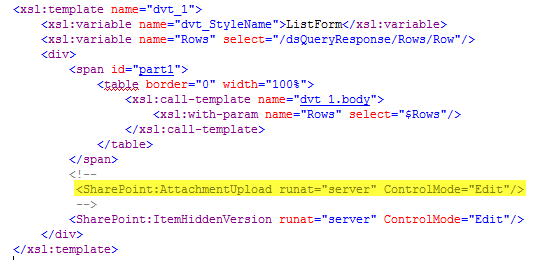
Edit the attachment control and display in the XSLT. Comment out the "SharePoint:AttachmentUpload" control in the dvt_1 template.
Comment out SharePoint:Attachments control in XSLT
Then comment out the "Attachments" row in the XSLT as well. Just to be tidy. That's usually at the bottom of the dvt_1.rowedit template.
Commenting out Attachments row in XSLT
You should be good to go!

CG


Monday, January 2, 2012

Building Dynamic Strings in SharePoint Designer 2010

(In keeping with my New Year’s resolution, here’s my first post!)

As with a lot of things in SP2010, The Build Dynamic String action is still there but it's been changed a bit. I don’t know why but the actual WorkFlow action itself is hidden by default in SPD 2010.

The good news: You can enable the action but you’ll have to have access to the 14 folder and then do an iisreset. (see note at the end)

The BETTER news: You can use the Build Dynamic String action via the “Set workflow variable” action! (You just need to be aware of a little quirk).

Get Started!
Go ahead and open up SPD2010 and create a new WorkFlow. For example purposes, it doesn’t matter if it’s a list or site WF.

Now, choose “Set workflow variable” but don’t name the variable yet. Click the “value” link.

Set workflow variable but dont name it yet.

Notice anything missing?

Missing String Builder dialog button.

You don’t see the lookup String Builder dialog button (String Builder dialog button.). You can’t build a dynamic string without one.

I’ve found that this button won’t appear unless you’ve created or named the variable already.

Go ahead and click “workflow variable” to create a named variable. I like to prefix my variables with “str”, “num”, or “var” depending on what I’ll be using them for. In this case, “strMyDynString.”

Name the variable first.

Now when I click “value” the String Builder dialog button is there and I can start building my dynamic string.

If you first create the variable and name it, the String Builder dialog button will appear and you can build your dynamic string!

Note: If you’re interested in re-enabling the action itself, have a look at Greg Osimowicz’s blog post on it.

Best!

CG

Thursday, December 22, 2011

New Year's Resolution!

That's right, I said it! "New Year's Resolution!" I'm putting this out there, in writing, publicly, for all to see.

Forget about losing weight (though I'm gonna try that too.) My new year's resolution is to put up at least 1 (one) blog post each week beginning January 1st, 2012. I'm also resolving to produce at least 1 (one) video blog post each month. If I fail to meet these deadlines, PLEASE CALL ME OUT ON IT!

I started this blog several years ago with the intent of sharing a lot of what I know and learn about SharePoint, IT, and life in general. You can see by the thin table of contents how well I've done with that. Heck, my last post was more than 2 1/2 years ago.

Weak!

But no more! Expect a lot of content coming in the new year. Hopefully, you will find it useful or, at the very least, entertaining.

Happy Holidays All!

Chris G.

Tuesday, March 24, 2009

Breaking The Workflow Mobious Loop

I'd built a WF on a list that fires when an item is created or changed only. It would check a field to see if it matches a RegularExpression- If so, set a Yes/No field in the current item to Yes. Otherwise, set it to No. That's it.

The regular expression (An artform in, and of, itself, which I'm convinced has something to do with alchemy or witchcraft) was fine but the WF locked up the item for an indeterminate amount of time so you can't go back into that item to make other changes. Attempting to do so resulted in the following error-


Save Conflict: Your changes conflict with those made concurrently by another user. If you want your changes to be applied, click Back in your Web browser, refresh the page, and resubmit your changes.
Description: An unhandled exception occurred during the execution of the current web request. Please review the stack trace for more information about the error and where it originated in the code.
Exception Details: Microsoft.SharePoint.SPException: Save ConflictYour changes conflict with those made concurrently by another user. If you want your changes to be applied, click Back in your Web browser, refresh the page, and resubmit your changes.
Source Error: An unhandled exception was generated during the execution of the current web request. Information regarding the origin and location of the exception can be identified using the exception stack trace below.
Stack Trace: [SPException: Save ConflictYour changes conflict with those made concurrently by another user. If you want your changes to be applied, click Back in your Web browser, refresh the page, and resubmit your changes.] Microsoft.SharePoint.WebControls.SaveButton.SaveItem(SPContext itemContext, Boolean uploadMode, String checkInComment) +452 Microsoft.SharePoint.WebControls.SaveButton.SaveItem() +58 Microsoft.SharePoint.WebControls.SaveButton.OnBubbleEvent(Object source, EventArgs e) +249 System.Web.UI.Control.RaiseBubbleEvent(Object source, EventArgs args) +35 System.Web.UI.WebControls.Button.OnCommand(CommandEventArgs e) +115 System.Web.UI.WebControls.Button.RaisePostBackEvent(String eventArgument) +163 System.Web.UI.WebControls.Button.System.Web.UI.IPostBackEventHandler.RaisePostBackEvent(String eventArgument) +7 System.Web.UI.Page.RaisePostBackEvent(IPostBackEventHandler sourceControl, String eventArgument) +11 System.Web.UI.Page.RaisePostBackEvent(NameValueCollection postData) +174 System.Web.UI.Page.ProcessRequestMain(Boolean includeStagesBeforeAsyncPoint, Boolean includeStagesAfterAsyncPoint) +5102


Even AFTER the workflow shows "Completed" Even AFTER 15 minutes of doing nothing. No one else was working on the list. No other workflows were involved.

After lots of WF analysis, a few beers, and some therapy, I'd concluded that the SPD WF is getting stuck in a loop. It shouldn't, but it is.

This only seems to happen if the WF is launched automatically whenever an item is changed AND that WF is modifying a field in the current item. Here's the scenario

You update an item.The WF kicks off and updates a field in the current item,
  which then registers as the item being changed...
    which kicks off the WF again...
      which updates the field in the current item...
        which registers as the item being changed...
          which kicks off the WF again...

See where I'm goin' with this?

I've experimented with a number work arounds and the best one I've found involves just adding a few Actions to your WF step.


  • After you: "Set field in current item"

  • Add to the same step: "Wait for field change in current item"

  • Then add to the same step: "Stop Workflow"


  • Stopping the workflow once the field is updated is crucial.

    I've also found that adding "Log to history list" at varying points in the WF step helps in debugging issues. Particularly if need to see if your WF Conditions are being met.

    I hope this helps save soemeone else some time. Though, I still encourage a few beers and some therapy.

    Cheers!

    Thursday, March 5, 2009

    SharePoint & Project Management

    First, let me say thanks for popping by and reading this. This is my first blog post- ever! I started this blog over 6 months ago, thinking I’d be posting every week after uncovering lots of inside information about SharePoint. Half a year later, I’m finally posting and it’s not even about SharePoint, strictly speaking.

    To that point, I think my original vision was a bit myopic. So this blog won’t be strictly about SharePoint. Instead, I’m going to attempt to use it as a place to share anything that I think you, the reader, might find interesting or useful.

    So, again, thanks for reading this. Now, on to my first post, which is, ultimately, a question…

    The company I'm consulting for has just gone through a major round of layoffs and a lot of really good people have lost there jobs. (If any of you are reading this, I want to say I’ve enjoyed working with you all and have learned a lot!)

    On top of that, it's been announced that IT will be off-shoring development- SharePoint development, in particular.

    Look folks, my opinions on sending our jobs overseas is irrelevant. But I do believe there are 3 facts that we’ve got to accept about off-shoring:
    1. It's happening.
    2. It will continue to happen*
    3. It's going to suck.

    No amount of complaining is going to change any of these facts. But I can’t help but believe that there are opportunities hidden here. So, keeping in mind fact #3, I’ve decided on one goal- Find a way to make it suck less.

    I’m a SharePoint consultant, so my initial thought is “How can I use SharePoint to make it suck less?” (PMTips.net has an
    article that I found quite useful.)

    But, in an on-going quest to end my own myopia, I can’t help but ask “what else is out there that can be used to facilitate project management- be it on or off shore?”

    What about Facebook, Twitter, Blogs (which SharePoint can handle), IM’s? What else is out there that can be used not just in a social way, but also as a business productivity tool? And, how can they be used this way?

    I’m putting the question out there and inviting ideas and feedback.

    Thanks again for reading my first shared point.


    ~CG


    *Until such time as the bean-counters decide it’s not saving any $$